
AZ Screen Recorder
Screenshots
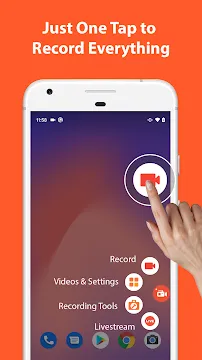


AZ Screen Recorder provides users with an easy way to capture high-quality videos on mobile devices. Mobile creators use this application to create smooth gameplay clips and detailed educational tutorials. In addition, users can control recording settings with just a few quick taps.
Many people prefer this application because it records crisp video without adding mandatory watermarks. Furthermore, you can capture full display resolution without setting strict time limitations on your projects. Consequently, content creators gain full control over their mobile screen recording workflow.
Streamlining Mobile Screen Capture With AZ Screen Recorder
Firstly, recording high-resolution video requires an intuitive interface that does not block important display elements. The floating control icon allows you to start, pause, and stop recordings instantly during any activity. Therefore, you can focus on your content without struggling with complicated settings menu layouts.
Meanwhile, background performance remains steady during intensive gaming sessions or live video presentations. The application manages system resources efficiently to avoid lag, dropped frames, or unexpected crashes. As a result, your recorded videos maintain continuous fluid movement from start to finish.
AZ Screen Recorder: Superior Gameplay and Tutorial Recording
Mobile gamers often need to document intense action clips with clear internal sound output. Luckily, this application captures high-fidelity game audio directly alongside external microphone commentary. Moreover, you can adjust sound volume balances to ensure your voice remains loud and clear.
On the other hand, educators require reliable tools to create clear step-by-step visual guides. You can easily highlight key details on your screen using integrated brush and annotation tools. Consequently, viewers understand complex procedures faster through clean, organized visual directions.
Optimizing Audio and Visual Capture Settings
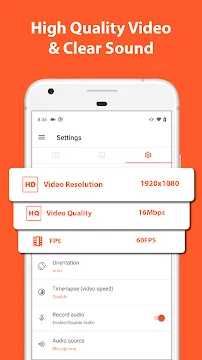
Adjusting your recording settings ensures that your output matches specific platform requirements. You can select custom resolutions ranging from standard definition up to crisp two K quality. In addition, higher bitrates preserve fine visual detail during fast movement in action games.
Secondly, sound configuration options give you complete control over your final audio mix. You can record internal system audio independently or mix it with external microphone inputs. Therefore, your commentary sounds clear without overpowering the background game sound effects.
Key Features of AZ Screen Recorder App For Android
This utility contains a wide array of tools designed to optimize mobile video production. Users can easily customize resolution, bitrates, and frame rates to match specific project requirements. In addition, integrated editing tools allow quick modifications immediately after finishing a recording session.
Above all, flexibility makes this application a top choice for beginners and professionals alike. You can access essential recording parameters directly from the main overlay dashboard without technical hassle. The following subsections detail the most important features available within the mobile application.
High Definition Video Capture
Users can record mobile screen actions in Full HD and 2K resolutions with crisp visual clarity. You can select custom frame rates up to sixty frames per second for smooth motion playbacks.
Furthermore, adjustable bitrate options help you balance visual file quality with device storage constraints. Consequently, your exported video clips look sharp across all digital viewing platforms.
Internal Audio and Microphone Support
The application captures clean system audio directly from internal app sources during recording sessions. You can also record external commentary simultaneously using your device microphone.
In addition, independent sound controls allow you to balance gameplay volume against your voiceover track. Therefore, your final audio mix sounds balanced and clear without annoying background distortion.
Facecam Overlay Window
Content creators can display a floating camera window over their recorded screen activities in real time. You can easily adjust the facecam overlay size and reposition it anywhere on your display.
Moreover, this feature adds a personal touch to gaming videos, reaction clips, and instructional guides. As a result, your audience connects better with your face and personal visual expressions.
Integrated Video Editor
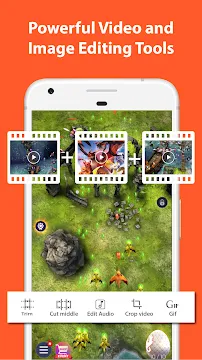
The built-in video editor provides practical tools to trim unnecessary footage right after capture. You can cut out middle sections, merge multiple video files, and crop frame dimensions easily.
Additionally, you can add background music, insert custom subtitles, and convert short clips into GIFs. Thus, you complete post-production tasks without transferring large video files to external computers.
Direct Live Streaming Capabilities
Broadcasters can stream their mobile display live to popular online broadcast networks with minimal latency. You can select custom stream resolutions to ensure smooth performance across different network speeds.
Furthermore, live chat overlay options allow you to view audience comments while streaming games live. Consequently, you interact with your viewers continuously during active broadcast sessions.
On-Screen Drawing and Screenshots
The built-in screen drawing tool enables you to draw shapes, symbols, and text while recording live. Teachers and presenters use this tool to draw immediate viewer attention toward critical display areas.
Likewise, you can capture instant high-resolution static screenshots with a single tap on the menu. The app includes basic image editing options to crop, blur, and annotate captured static images.
Managing Recorded Video Storage Efficiently with AZ Screen Recorder
Storing high-definition video files can consume mobile device storage space very quickly. Therefore, organizing your recorded video files regularly helps maintain optimal device performance. You can move completed project files to cloud storage or external drives easily.
In addition, using the built-in video compressor significantly reduces overall file sizes. This option allows you to save phone storage without sacrificing important visual quality. Consequently, you can maintain a clean media library while keeping essential recordings accessible.
AZ Screen Recorder: Enhancing Mobile Content Workflows
Modern mobile creators require dependable tools that operate seamlessly during daily recording tasks. This application simplifies video creation by combining recording, editing, and streaming functions into one package. Therefore, you save valuable time by avoiding complicated multi-app media production workflows.
Furthermore, steady updates ensure optimal performance across various mobile processor configurations. You can produce professional video clips without experiencing frustrating system lags or audio sync errors. In short, adopting efficient recording utilities elevates overall digital media creation quality significantly.
How to Download and Install AZ Screen Recorder APK
Downloading the file on your device takes only a few simple steps. Click the download button on our page to start grabbing the installation package immediately. After that, follow the quick steps listed below to complete the setup process smoothly.
- Click the download button on our web page to acquire the latest installation file.
- Open your device security settings and grant permission to install files from unknown sources.
- Locate the saved file inside your mobile device file manager folder.
- Tap on the file icon to launch the automatic package installer prompt.
- Confirm the installation permissions and wait a few seconds for completion.
- Open the newly installed application and grant required screen recording permissions.
AZ Screen Recorder Tips and Tricks
- Configure your video resolution and frame rate settings before starting long recording sessions.
- Enable the floating control button to start or pause recordings without opening the main app interface.
- Use the shake gesture feature to stop screen recording instantly without showing control menus.
- Turn on the facecam overlay feature when producing personal reaction videos or interactive game commentaries.
- Utilize the built-in video compression tool to reduce large file sizes without sacrificing visual clarity.
- Activate the draw on screen tool during educational presentations to highlight critical text and graphics.
Professional Conclusion
To sum up, AZ Screen Recorder provides a complete feature set for mobile screen capture requirements. Whether you record high-speed gaming footage or detailed tutorials, the application operates smoothly and reliably. In addition, sound options and built-in editing tools give creators maximum creative flexibility.
Most importantly, the clean user interface makes screen recording accessible to everyone regardless of technical skills. You can produce, edit, and share high-definition videos quickly without restrictive watermarks or time limits. Therefore, installing this application remains a smart choice for all mobile video content creators.
- Video MP3 Converter
- XRecorder Screen Recorder
-
PowerDirector
 Download
PowerDirector - Video Editor
PowerDirector offers an incredible video editing experience...
- VITA – Video Editor & Maker
- Amazon Photos
- CapCut
- TIDAL Music
- Blurrr